20.2 The Final Project - Multithreaded Web Server
20.2.1 Review
In our previous article, we described a simple local server. However, this server is single-threaded, meaning that requests are processed one by one. We have to handle each request individually. If a certain request takes a long time to process, the subsequent ones will have to wait in line. The performance of this single-threaded external server is extremely poor.
20.2.2 Slow Requests
We can use code to simulate a slow request:
#![allow(unused)]
fn main() {
use std::{
    fs,
    io::{prelude::*, BufReader},
    net::{TcpListener, TcpStream},
    thread,
    time::Duration,
};
// ...

fn handle_connection(mut stream: TcpStream) {
    // ...

    let (status_line, filename) = match &request_line[..] {
        "GET / HTTP/1.1" => ("HTTP/1.1 200 OK", "hello.html"),
        "GET /sleep HTTP/1.1" => {
            thread::sleep(Duration::from_secs(5));
            ("HTTP/1.1 200 OK", "hello.html")
        }
        _ => ("HTTP/1.1 404 NOT FOUND", "404.html"),
    };

    // ...
}
}
Some original code has been omitted, but that does not affect the explanation. The statement we added makes the code sleep for 5 seconds when the user visits 127.0.0.1:7878/sleep, which simulates a slow request.
Now open two browser windows: one for http://127.0.0.1:7878/ and one for http://127.0.0.1:7878/sleep. As before, you will see a quick response on the normal route. But if you enter /sleep and load the page, you will see that the browser waits the full 5 seconds before it finishes loading.
How can we improve this situation? Here we will use thread pool technology. Other options include a fork/join model, a single-threaded asynchronous I/O model, or a multithreaded asynchronous I/O model.
20.2.3 Using a Thread Pool to Improve Throughput
A thread pool is a collection of allocated threads that wait for tasks and can be used whenever tasks arrive. When the program receives a new task, it assigns the task to one of the threads in the pool, while the other threads can continue receiving other tasks at the same time. When the task is finished, that thread is returned to the pool.
Thread pools increase server throughput by allowing connections to be processed concurrently.
How do we create a thread for each connection? Take a look:
fn main() {
    let listener = TcpListener::bind("127.0.0.1:7878").unwrap();

    for stream in listener.incoming() {
        let stream = stream.unwrap();

        thread::spawn(|| {
            handle_connection(stream);
        });
    }
}
Each iteration of the iterator creates a new thread to handle the connection.
The drawback is that the number of threads is unlimited: a new thread is created for every request. If a hacker launches a DoS (Denial of Service) attack, our server will quickly collapse.
So based on the code above, we will make a change. We will use compiler-driven development to write the code (this is not a standard development methodology, but rather a joke among developers, unlike TDD test-driven development): write the function or type you expect to call first, and then fix the code step by step based on compiler errors.
Using Compiler-Driven Development
Let’s write the code we want directly first, without worrying about whether it is right:
fn main() {
    let listener = TcpListener::bind("127.0.0.1:7878").unwrap();
    let pool = ThreadPool::new(4);

    for stream in listener.incoming() {
        let stream = stream.unwrap();

        pool.execute(|| {
            handle_connection(stream);
        });
    }
}
Although there is no ThreadPool type yet, according to the logic of compiler-driven development, we just write it first and worry about correctness later.
Run cargo check:
error[E0433]: cannot find type `ThreadPool` in this scope
  --> src/main.rs:11:16
   |
11 |     let pool = ThreadPool::new(4);
   |                ^^^^^^^^^^ use of undeclared type `ThreadPool`

For more information about this error, try `rustc --explain E0433`.
error: could not compile `web_server` (bin "web_server") due to 1 previous error
This error tells us that we need a ThreadPool type or module, so we will build one now.
We will write the ThreadPool-related code in lib.rs. On the one hand, that keeps main.rs simple enough; on the other hand, it allows the ThreadPool code to live independently.
Open lib.rs and write a simple definition for ThreadPool:
#![allow(unused)]
fn main() {
pub struct ThreadPool;
}
Bring ThreadPool into scope in main.rs:
#![allow(unused)]
fn main() {
use web_server::ThreadPool;
}
Run cargo check:
error[E0599]: no associated function or constant named `new` found for struct `ThreadPool` in the current scope
  --> src/main.rs:12:28
   |
12 |     let pool = ThreadPool::new(4);
   |                            ^^^ associated function or constant not found in `ThreadPool`

For more information about this error, try `rustc --explain E0599`.
error: could not compile `web_server` (bin "web_server") due to 1 previous error
This error shows that we now need an associated function named new on ThreadPool. We also know that new needs to accept a parameter that can take 4, and it should return a ThreadPool instance. Let’s implement the simplest possible new function with those characteristics:
#![allow(unused)]
fn main() {
pub struct ThreadPool;

impl ThreadPool {
    pub fn new(size: usize) -> ThreadPool {
        ThreadPool
    }
}
}
Run cargo check:
error[E0599]: no method named `execute` found for struct `ThreadPool` in the current scope
  --> src/main.rs:17:14
   |
17 |         pool.execute(|| {
   |         -----^^^^^^^ method not found in `ThreadPool`

For more information about this error, try `rustc --explain E0599`.
error: could not compile `web_server` (bin "web_server") due to 1 previous error
Now we get an error because ThreadPool does not have an execute method. So let’s add one:
#![allow(unused)]
fn main() {
pub fn execute<F>(&self, f: F)
where
    F: FnOnce() + Send + 'static,
{
}
}- In addition to
self, theexecutefunction takes a closure parameter. The thread handling the request will only call the closure once, so we useFnOnce(). The()means it is a closure that returns the unit type(). We also need theSendtrait so the closure can be transferred from one thread to another, and'staticbecause we do not know how long the thread will run. - Another way to think about it is that we are replacing the original
thread::spawnfunction with this one, so when we modify it we can borrow its function signature. Its signature is shown below. The main pieces we borrow are the genericFand its bounds, so the generic bounds forexecutecan be written in the same style.
#![allow(unused)]
fn main() {
pub fn spawn<F, T>(f: F) -> JoinHandle<T>
where
    F: FnOnce() -> T,
    F: Send + 'static,
    T: Send + 'static,
}
cargo check now reports no errors, but cargo run still will not handle requests correctly, because execute and new do not actually do anything yet; they only satisfy the compiler.
You may have heard the saying about languages with strict compilers, such as Haskell and Rust: “If the code compiles, it works.” But that is not universally true. Our project compiles, but it does nothing. If we were building a real, complete project, this would be a good time to start writing unit tests to check that the code compiles and behaves the way we want it to, which is TDD test-driven development.
Modifying the new Function, Part 1
Let’s first modify new so that it has real meaning:
#![allow(unused)]
fn main() {
impl ThreadPool {
    /// Create a new ThreadPool.
    ///
    /// The size is the number of threads in the pool.
    ///
    /// # Panics
    ///
    /// The `new` function will panic if the size is zero.
    pub fn new(size: usize) -> ThreadPool {
        assert!(size > 0);

        ThreadPool
    }

    // ...
}
}- We use the
assert!macro to check that thenewfunction’s argument is greater than 0, because 0 would be meaningless. - We add some documentation comments so that they appear when we run
cargo doc --open: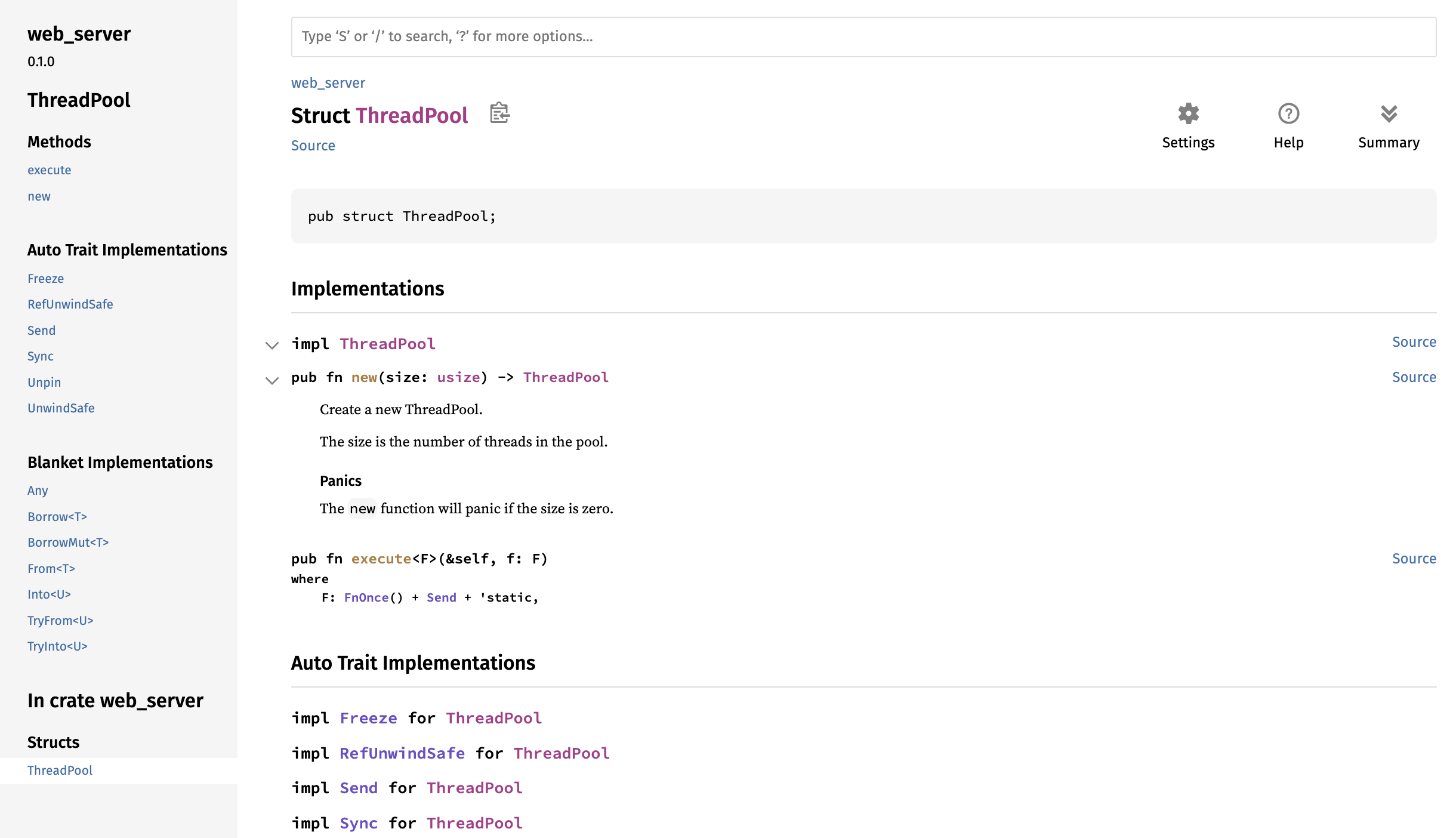
Modifying the ThreadPool Type
The new function has hit a bottleneck: ThreadPool has no concrete fields, so we cannot implement the goal of creating a specific number of threads. So next we will study how to store threads inside ThreadPool:
#![allow(unused)]
fn main() {
use std::thread;

pub struct ThreadPool {
    threads: Vec<thread::JoinHandle<()>>,
}
}
ThreadPool has a threads field of type Vec<thread::JoinHandle<()>>:
- We use
Vec<>because we want to store multiple threads, but the exact number is unknown, so we use aVector. - Earlier, we looked at the signature of
thread::spawn. Its return value isJoinHandle<T>, so by analogy we also usethread::JoinHandle<>to store threads. The reasonJoinHandle<T>has aTis that the thread created bythread::spawnmay return a value, and because we do not know the specific type, we use a generic to represent it. Our code is certain to have no return value, so we writethread::JoinHandle<()>, where()is the unit type.
Modifying the new Function, Part 2
After changing the ThreadPool definition, let’s go back and modify new:
#![allow(unused)]
fn main() {
pub fn new(size: usize) -> ThreadPool {
    assert!(size > 0);

    let mut threads = Vec::with_capacity(size);

    for _ in 0..size {
        // create some threads and store them in the vector
    }

    ThreadPool { threads }
}
}Vec::with_capacitycreates aVectorwith preallocated capacity by takingsizeas its argument.- We write a loop from
0tosize(not includingsize). The logic inside is not written yet, but the loop is meant to create threads and store them in theVector. - Finally, we return a
ThreadPoolvalue, and thethreadsfield is assigned thethreadsvariable from this function.
Next, we will study the thread::spawn function so that it is easier to write the loop inside new. thread::spawn immediately starts executing the code a thread should run after the thread is created. However, in our case, we want to create the threads and have them wait for code that we send later. The standard library’s thread implementation does not provide any method for that, so we have to implement it ourselves.
Using a Worker Data Structure
We use a new data structure to implement this behavior, called a Worker, which is a common term in pool implementations. A Worker picks up code that needs to run and runs it on the Worker’s thread. Imagine the people working in a restaurant kitchen: the workers wait for customers to place orders and then accept and fulfill those orders. We use Workers to manage and implement the behavior we want.
Let’s create the Worker struct and the necessary methods:
#![allow(unused)]
fn main() {
struct Worker {
    id: usize,
    thread: thread::JoinHandle<()>,
}

impl Worker {
    fn new(id: usize) -> Worker {
        let thread = thread::spawn(|| {});

        Worker { id, thread }
    }
}
}Workerhas two fields:id, of typeusize, which identifies the worker; andthread, of typethread::JoinHandle<()>, which stores a thread.- The
newfunction creates aWorkerinstance, and the value of theidfield is the parameter passed in.
PS: External code, such as the server in main.rs, does not need to know the implementation details of how Worker is used inside ThreadPool, so we make the Worker struct and its new function private.
Next, use Worker inside ThreadPool:
#![allow(unused)]
fn main() {
pub struct ThreadPool {
    workers: Vec<Worker>,
}
}
The new and execute functions on ThreadPool also need to change. We will modify new first and leave execute for later:
#![allow(unused)]
fn main() {
pub fn new(size: usize) -> ThreadPool {
    assert!(size > 0);

    let mut workers = Vec::with_capacity(size);

    for id in 0..size {
        workers.push(Worker::new(id));
    }

    ThreadPool { workers }
}
}- Change the
threads-related code toworkers. - Because the
Workerfield inThreadPoolis wrapped in aVector, we can use thepushmethod onVectorto add new elements. - Inside the loop, we call
Worker::newto create aWorkerinstance, and theidfield is the value passed in as the parameter.
PS: If the operating system cannot create a thread because there are not enough system resources, thread::spawn will panic. We do not consider that case in this example, but in real code it is better to account for it by using std::thread::Builder, which returns a Result<JoinHandle<T>>.
Sending Requests to Threads Through a Channel
Now that thread creation is done, the next question is how to receive tasks. This is where a channel comes in. Refactor the code like this:
#![allow(unused)]
fn main() {
use std::thread;
use std::sync::mpsc;

pub struct ThreadPool {
    workers: Vec<Worker>,
    sender: mpsc::Sender<Job>,
}

struct Job;
}- Bring
mpscinto scope withuse std::sync::mpsc;so that we can use it later. - Add a new field named
sendertoThreadPool. Its type ismpsc::Sender<Job>(Jobis a struct representing the work to be executed), and it stores the sending end of the channel.
Create the channel in ThreadPool::new:
#![allow(unused)]
fn main() {
impl ThreadPool {
    // ...
    pub fn new(size: usize) -> ThreadPool {
        assert!(size > 0);
        let (sender, receiver) = mpsc::channel();
        let mut workers = Vec::with_capacity(size);

        for id in 0..size {
            workers.push(Worker::new(id, receiver));
        }

        ThreadPool { workers, sender }
    }
    // ...
}
// ...
impl Worker {
    fn new(id: usize, receiver: mpsc::Receiver<Job>) -> Worker {
        let thread = thread::spawn(|| {
            receiver;
        });

        Worker { id, thread }
    }
}
}- Use
mpsc::channel()to create a channel. The sender and receiver are namedsenderandreceiver. - Assign
senderto thesenderfield of the return value; in other words, the thread pool owns the sending end of the channel. - The receiver should belong to the
Worker, so we also changeWorker::newand add thereceiverparameter.
Try cargo check now:
error[E0382]: use of moved value: `receiver`
  --> src/lib.rs:18:42
   |
14 |         let (sender, receiver) = mpsc::channel();
   |                      -------- move occurs because `receiver` has type `std::sync::mpsc::Receiver<Job>`, which does not implement the `Copy` trait
...
17 |         for id in 0..size {
   |         ----------------- inside of this loop
18 |             workers.push(Worker::new(id, receiver));
   |                                          ^^^^^^^^ value moved here, in previous iteration of loop
   |
note: consider changing this parameter type in method `new` to borrow instead if owning the value isn't necessary
  --> src/lib.rs:37:33
   |
37 |     fn new(id: usize, receiver: mpsc::Receiver<Job>) -> Worker {
   |        --- in this method       ^^^^^^^^^^^^^^^^^^^ this parameter takes ownership of the value

For more information about this error, try `rustc --explain E0382`.
error: could not compile `web_server` (lib) due to 1 previous error
The error occurs because the code tries to pass one receiver to multiple Worker instances, which will not work because there can only be one receiver end.
We want all threads to share the same receiver so that tasks can be distributed among them. In addition, taking items out of the channel queue requires changing receiver, so the threads need a safe way to share and mutate receiver. Otherwise, we could run into race conditions.
For multiple owners in a multithreaded context, we can use Arc<T> (Rc<T> is only for single-threaded code). For avoiding data races in multithreaded code, we can use the mutex Mutex<T>.
So we just wrap the original receiver in Arc<T> and Mutex<T>:
#![allow(unused)]
fn main() {
impl ThreadPool {
    /// ...
    pub fn new(size: usize) -> ThreadPool {
        assert!(size > 0);
        let (sender, receiver) = mpsc::channel();
        let mut workers = Vec::with_capacity(size);

        let receiver = Arc::new(Mutex::new(receiver));
        for id in 0..size {
            workers.push(Worker::new(id, Arc::clone(&receiver)));
        }

        ThreadPool { workers, sender }
    }
    //...
}
//...

impl Worker {
    fn new(id: usize, receiver: Arc<Mutex<mpsc::Receiver<Job>>>) -> Worker {
        let thread = thread::spawn(|| {
            receiver;
        });

        Worker { id, thread }
    }
}
}- Rebind
receiverso that it is wrapped inArc<T>andMutex<T>. - Inside the loop, pass
Arc::clone(&receiver)to eachWorker. - The
receiverparameter inWorker::newmust change toArc<Mutex<mpsc::Receiver<Job>>>.
Modifying Job
Our Job is still an empty struct and has no real effect, so we will change it into a type alias (see 19.5. Advanced Types):
#![allow(unused)]
fn main() {
type Job = Box<dyn FnOnce() + Send + 'static>;
}
Job is a closure that is called only once in one thread and has no return value (or, equivalently, returns the unit type ()), so it must satisfy FnOnce(). It also needs to be transferable between threads, so it must satisfy the Send trait. 'static is used because we do not know how long the thread will run, so we declare it to have a static lifetime.
Modifying the execute Function
Next, let’s modify execute:
#![allow(unused)]
fn main() {
pub fn execute<F>(&self, f: F)
where
    F: FnOnce() + Send + 'static,
{
    let job = Box::new(f);

    self.sender.send(job).unwrap();
}
}- Because
Jobis wrapped inBox<T>, the closurefmust first be wrapped withBox::newbefore it can be sent out. - Use the
senderfield onselfas the sending end to send thejob.
Modifying Worker::new
Now that execute has changed, Worker::new, which acts as the receiver, must also change:
#![allow(unused)]
fn main() {
impl Worker {
    fn new(id: usize, receiver: Arc<Mutex<mpsc::Receiver<Job>>>) -> Worker {
        let thread = thread::spawn(move || loop {
            let job = receiver.lock().unwrap().recv().unwrap();
            println!("Worker {} got a job; executing.", id);
            job();
        });

        Worker { id, thread }
    }
}
}- Use
lockto lockreceiver(which is wrapped inMutex<T>) and obtain the mutex guard, usingunwrapfor error handling. - Then use
recvto receive the value sent through the channel, and useunwrapagain for error handling. - Print which
Workeris doing the work. - When
job();is called, the compiler automatically dereferencesjobto its inner closure type and then calls the appropriatecallmethod from theFnOnceor related trait implementation. That is becauseBox<dyn FnOnce()>implementsFnOnce. In other words,job();is syntactic sugar for(*job)();.
Version Differences
I am using Rust 1.84.0. In older Rust versions, you could not call job(); directly, and you also could not use (*job)();, because the compiler did not directly know how to handle a boxed trait object. In newer Rust versions, direct calls on Box<dyn Trait> are supported by the compiler’s deref-and-call dispatch logic.
If your version of Rust rejects the code above, then either upgrade Rust or use a small workaround:
#![allow(unused)]
fn main() {
trait FnBox {
    fn call_box(self: Box<Self>);
}

impl<F: FnOnce()> FnBox for F {
    fn call_box(self: Box<F>) {
        (*self)();
    }
}

type Job = Box<dyn FnBox + Send + 'static>;
}- The
FnBoxtrait lets us call methods on a boxed type. - We implement
call_boxforFnOnce()(becauseJobimplementsFnOnce()), which gives us ownership of the value inside theBoxso that it can be called. - We change the
Jobtype fromFnOnce()toFnBox, so the rest of the code does not need to change. Anything that implementsFnBoxcan be used as a job in this workaround.
20.2.4 Trial Run
Finally, after all that work, let’s try running it:
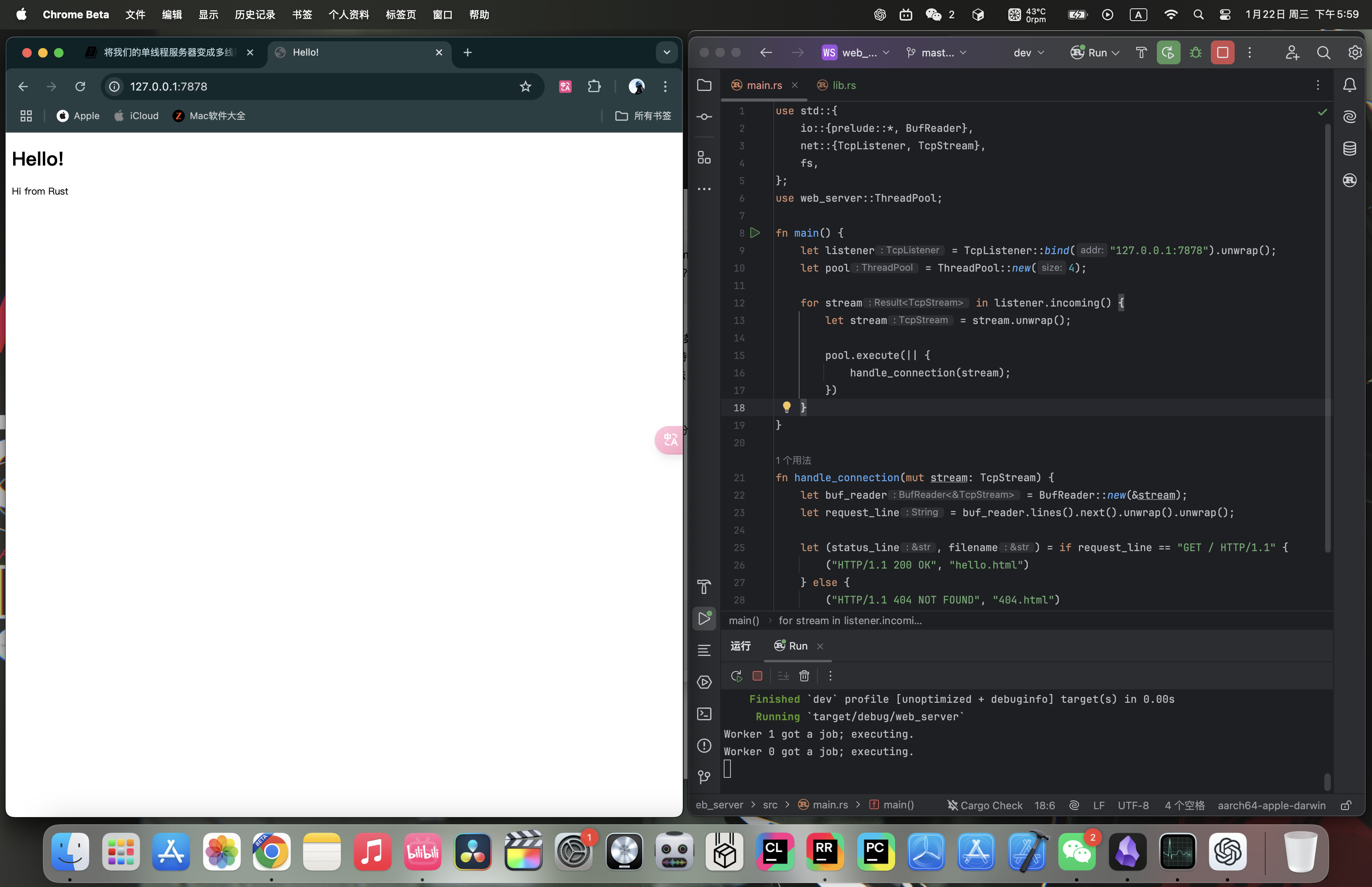
Terminal output (worker assignment is nondeterministic):
Worker 1 got a job; executing.
Worker 0 got a job; executing.
If you refresh the page in the browser a few times, you can see other Workers with different ids doing the work.
20.2.5 Summary
main.rs:
use std::{
    fs,
    io::{prelude::*, BufReader},
    net::{TcpListener, TcpStream},
    thread,
    time::Duration,
};
use web_server::ThreadPool;

fn main() {
    let listener = TcpListener::bind("127.0.0.1:7878").unwrap();
    let pool = ThreadPool::new(4);

    for stream in listener.incoming() {
        let stream = stream.unwrap();

        pool.execute(|| {
            handle_connection(stream);
        });
    }
}

fn handle_connection(mut stream: TcpStream) {
    let buf_reader = BufReader::new(&stream);
    let request_line = buf_reader.lines().next().unwrap().unwrap();

    let (status_line, filename) = match &request_line[..] {
        "GET / HTTP/1.1" => ("HTTP/1.1 200 OK", "hello.html"),
        "GET /sleep HTTP/1.1" => {
            thread::sleep(Duration::from_secs(5));
            ("HTTP/1.1 200 OK", "hello.html")
        }
        _ => ("HTTP/1.1 404 NOT FOUND", "404.html"),
    };

    let contents = fs::read_to_string(filename).unwrap();
    let length = contents.len();

    let response =
        format!("{status_line}\r\nContent-Length: {length}\r\n\r\n{contents}");

    stream.write_all(response.as_bytes()).unwrap();
}lib.rs:
#![allow(unused)]
fn main() {
use std::{
    sync::{mpsc, Arc, Mutex},
    thread,
};

pub struct ThreadPool {
    workers: Vec<Worker>,
    sender: mpsc::Sender<Job>,
}

type Job = Box<dyn FnOnce() + Send + 'static>;

impl ThreadPool {
    /// Create a new ThreadPool.
    ///
    /// The size is the number of threads in the pool.
    ///
    /// # Panics
    ///
    /// The `new` function will panic if the size is zero.
    pub fn new(size: usize) -> ThreadPool {
        assert!(size > 0);
        let (sender, receiver) = mpsc::channel();
        let mut workers = Vec::with_capacity(size);

        let receiver = Arc::new(Mutex::new(receiver));
        for id in 0..size {
            workers.push(Worker::new(id, Arc::clone(&receiver)));
        }

        ThreadPool { workers, sender }
    }

    pub fn execute<F>(&self, f: F)
    where
        F: FnOnce() + Send + 'static,
    {
        let job = Box::new(f);

        self.sender.send(job).unwrap();
    }
}

struct Worker {
    id: usize,
    thread: thread::JoinHandle<()>,
}

impl Worker {
    fn new(id: usize, receiver: Arc<Mutex<mpsc::Receiver<Job>>>) -> Worker {
        let thread = thread::spawn(move || loop {
            let job = receiver.lock().unwrap().recv().unwrap();
            println!("Worker {} got a job; executing.", id);
            job();
        });

        Worker { id, thread }
    }
}
}hello.html:
<!DOCTYPE html>
<html lang="en">
<head>
    <meta charset="utf-8">
    <title>Hello!</title>
</head>
<body>
<h1>Hello!</h1>
<p>Hi from Rust</p>
</body>
</html>
404.html:
<!DOCTYPE html>
<html lang="en">
<head>
  <meta charset="utf-8">
  <title>Hello!</title>
</head>
<body>
<h1>Oops!</h1>
<p>Sorry, I don't know what you're asking for.</p>
</body>
</html>