20.2 最后的项目:多线程Web服务器
20.2.1. 回顾
在上一篇文章中,我们写了一个简单的本地服务器。不过,这个服务器是单线程的,也就是说请求会一个一个被处理。我们得逐个处理每个请求;如果某个请求处理得很慢,后面的就得排队等待。这种单线程外部服务器的性能非常差。
20.2.2. 慢速请求
我们可以用代码来模拟慢速请求:
#![allow(unused)]
fn main() {
use std::{
    fs,
    io::{prelude::*, BufReader},
    net::{TcpListener, TcpStream},
    thread,
    time::Duration,
};
// ...

fn handle_connection(mut stream: TcpStream) {
    // ...

    let (status_line, filename) = match &request_line[..] {
        "GET / HTTP/1.1" => ("HTTP/1.1 200 OK", "hello.html"),
        "GET /sleep HTTP/1.1" => {
            thread::sleep(Duration::from_secs(5));
            ("HTTP/1.1 200 OK", "hello.html")
        }
        _ => ("HTTP/1.1 404 NOT FOUND", "404.html"),
    };

    // ...
}
}
一些原代码被省略了,但不影响说明。我们增加的语句会在用户访问 127.0.0.1:7878/sleep 时让代码休眠 5 秒,以此模拟慢速请求。
现在打开两个浏览器窗口:一个访问 http://127.0.0.1:7878/,另一个访问 http://127.0.0.1:7878/sleep。和以前一样,你会看到正常路由快速响应。但如果你输入 /sleep 并加载页面,就会看到浏览器在完成加载前会完整等待 5 秒。
如何改善这种情况呢?这里我们使用线程池技术。其他可选方案还包括fork/join 模型、单线程异步 I/O 模型或多线程异步 I/O 模型。
20.2.3. 使用线程池提高吞吐量
线程池是一组已分配好的线程,它们会等待任务,并在任务到来时随时可用。当程序接收到一个新任务时,它会把任务分配给池中的某个线程,同时其余线程还可以继续接收其他任务。任务完成后,该线程会被放回线程池。
线程池通过允许并发处理连接的方式提高了服务器吞吐量。
如何为每个连接创建一个线程呢?看这里:
fn main() {
    let listener = TcpListener::bind("127.0.0.1:7878").unwrap();

    for stream in listener.incoming() {
        let stream = stream.unwrap();

        thread::spawn(|| {
            handle_connection(stream);
        });
    }
}
迭代器每迭代一次,就会创建一个新线程来处理连接。
缺点是线程数量没有限制:每个请求都会创建一个新线程。如果黑客发起 DoS(Denial of Service,拒绝服务)攻击,我们的服务器很快就会崩溃。
所以在上面代码的基础上,我们进行修改。我们将使用编译驱动开发来编写代码(这不是一种标准的开发方法论,而是开发者之间的一种戏称,不同于 TDD 测试驱动开发):先写出期望调用的函数或类型,再根据编译器错误一步步修复。
使用编译驱动开发
我们先直接写出想要的代码,先不管它对不对:
fn main() {
    let listener = TcpListener::bind("127.0.0.1:7878").unwrap();
    let pool = ThreadPool::new(4);

    for stream in listener.incoming() {
        let stream = stream.unwrap();

        pool.execute(|| {
            handle_connection(stream);
        });
    }
}
虽然还没有 ThreadPool 类型,但按照编译驱动开发的逻辑,我们先写上,稍后再关心正确性。
运行 cargo check:
error[E0433]: cannot find type `ThreadPool` in this scope
  --> src/main.rs:11:16
   |
11 |     let pool = ThreadPool::new(4);
   |                ^^^^^^^^^^ use of undeclared type `ThreadPool`

For more information about this error, try `rustc --explain E0433`.
error: could not compile `web_server` (bin "web_server") due to 1 previous error
这个错误告诉我们需要一个 ThreadPool 类型或模块,所以现在就来构建一个。
我们将把 ThreadPool 相关代码写在 lib.rs 中。一方面,这能让 main.rs 足够简洁;另一方面,也让 ThreadPool 代码可以独立存在。
打开 lib.rs,写下 ThreadPool 的简单定义:
#![allow(unused)]
fn main() {
pub struct ThreadPool;
}
在 main.rs 中把 ThreadPool 引入作用域:
#![allow(unused)]
fn main() {
use web_server::ThreadPool;
}
运行 cargo check:
error[E0599]: no associated function or constant named `new` found for struct `ThreadPool` in the current scope
  --> src/main.rs:12:28
   |
12 |     let pool = ThreadPool::new(4);
   |                            ^^^ associated function or constant not found in `ThreadPool`

For more information about this error, try `rustc --explain E0599`.
error: could not compile `web_server` (bin "web_server") due to 1 previous error
这个错误表明,我们现在需要在 ThreadPool 上有一个名为 new 的关联函数。我们还知道 new 需要接受一个可以传入 4 的参数,并且应该返回一个 ThreadPool 实例。让我们实现具备这些特征的最简单 new 函数:
#![allow(unused)]
fn main() {
pub struct ThreadPool;

impl ThreadPool {
    pub fn new(size: usize) -> ThreadPool {
        ThreadPool
    }
}
}
运行 cargo check:
error[E0599]: no method named `execute` found for struct `ThreadPool` in the current scope
  --> src/main.rs:17:14
   |
17 |         pool.execute(|| {
   |         -----^^^^^^^ method not found in `ThreadPool`

For more information about this error, try `rustc --explain E0599`.
error: could not compile `web_server` (bin "web_server") due to 1 previous error
现在报错是因为 ThreadPool 没有 execute 方法。那就补上一个:
#![allow(unused)]
fn main() {
pub fn execute<F>(&self, f: F)
where
    F: FnOnce() + Send + 'static,
{
}
}- 除了
self,execute函数还接受一个闭包参数。处理请求的线程只会调用该闭包一次,所以我们使用FnOnce()。()表示它是返回单元类型()的闭包。我们还需要Sendtrait,以便把闭包从一个线程传递到另一个线程;以及'static,因为我们不知道线程会运行多久。 - 另一种理解方式是:我们是在用它替换原来的
thread::spawn函数,所以修改时可以借鉴它的函数签名。其签名如下。我们主要借鉴的是泛型F及其约束,因此execute的泛型约束可以按同样风格来写。
#![allow(unused)]
fn main() {
pub fn spawn<F, T>(f: F) -> JoinHandle<T>
where
    F: FnOnce() -> T,
    F: Send + 'static,
    T: Send + 'static,
}
现在 cargo check 已经没有错误了,但 cargo run 仍然无法正确处理请求,因为 execute 和 new 实际上还什么都没做,只是满足了编译器。
你可能听说过关于具有严格编译器的语言(例如 Haskell 和 Rust)的一句话:“如果代码能编译,它就能工作。”但这并不普遍正确。我们的项目可以编译,但它什么也没做。如果我们正在构建一个真实、完整的项目,那么这会是开始编写单元测试、检查代码是否编译并具有我们期望行为的好时机,也就是 TDD 测试驱动开发。
修改 new 函数,第 1 部分
我们先修改 new,让它具有实际意义:
#![allow(unused)]
fn main() {
impl ThreadPool {
    /// Create a new ThreadPool.
    ///
    /// The size is the number of threads in the pool.
    ///
    /// # Panics
    ///
    /// The `new` function will panic if the size is zero.
    pub fn new(size: usize) -> ThreadPool {
        assert!(size > 0);

        ThreadPool
    }

    // ...
}
}- 我们使用
assert!宏检查new函数的参数大于 0,因为 0 没有任何意义。 - 我们添加了一些文档注释,这样在运行
cargo doc --open时就能看到: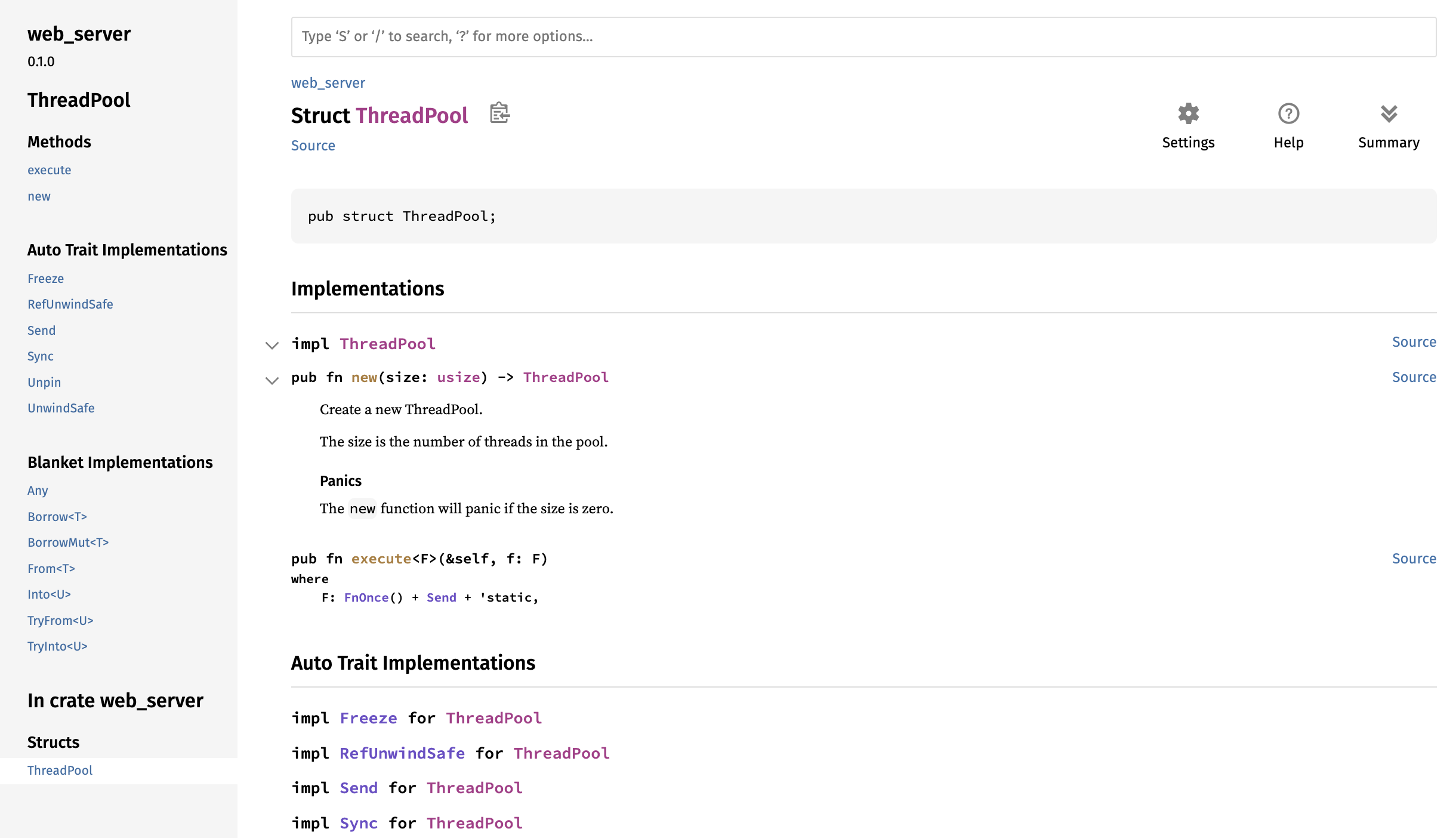
修改 ThreadPool 类型
new 函数的修改遇到了瓶颈:ThreadPool 还没有具体字段,因此无法实现创建指定数量线程的目标。接下来我们研究如何在 ThreadPool 中存储线程:
#![allow(unused)]
fn main() {
use std::thread;

pub struct ThreadPool {
    threads: Vec<thread::JoinHandle<()>>,
}
}
ThreadPool 有一个类型为 Vec<thread::JoinHandle<()>> 的 threads 字段:
- 我们使用
Vec<>,因为要存储多个线程,但确切数量未知,所以用Vector。 - 之前我们看过
thread::spawn的签名,其返回值是JoinHandle<T>,依此我们也用thread::JoinHandle<>来存储线程。JoinHandle<T>有一个T,是因为thread::spawn创建的线程可能有返回值,而我们不知道具体类型,所以用泛型表示。我们的代码确定没有返回值,所以写成thread::JoinHandle<()>,其中()是单元类型。
修改 new 函数,第 2 部分
改完 ThreadPool 的定义后,我们再回来修改 new:
#![allow(unused)]
fn main() {
pub fn new(size: usize) -> ThreadPool {
    assert!(size > 0);

    let mut threads = Vec::with_capacity(size);

    for _ in 0..size {
        // create some threads and store them in the vector
    }

    ThreadPool { threads }
}
}Vec::with_capacity以size为参数,创建一个预分配容量的Vector。- 我们写了一个从
0到size(不含size)的循环。里面的逻辑还没写,但这个循环是用来创建线程并把它们存进Vector的。 - 最后返回一个
ThreadPool值,其threads字段赋值为本函数中的threads变量。
接下来我们研究 thread::spawn 函数,以便更容易写出 new 里的循环。thread::spawn 在线程创建后会立即开始执行线程应运行的代码。然而在我们的例子中,我们想创建线程并让它们等待我们稍后发送的代码。标准库的线程实现没有提供这样做的方法,所以我们必须自己实现。
使用 Worker 数据结构
我们使用一种新的数据结构来实现这种行为,叫做 Worker,这是池实现中的常用术语。Worker 会拾取需要运行的代码,并在 Worker 的线程中运行它。想象一下在餐厅厨房工作的人:工人们等待顾客下单,然后接受并完成这些订单。我们用 Worker 来管理和实现想要的行为。
让我们创建 Worker 结构体及必要的方法:
#![allow(unused)]
fn main() {
struct Worker {
    id: usize,
    thread: thread::JoinHandle<()>,
}

impl Worker {
    fn new(id: usize) -> Worker {
        let thread = thread::spawn(|| {});

        Worker { id, thread }
    }
}
}Worker有两个字段:id,类型为usize,用于标识 worker;以及thread,类型为thread::JoinHandle<()>,用于存储一个线程。new函数创建一个Worker实例,id字段的值就是传入的参数。
PS:外部代码(例如 main.rs 中的服务器)不需要知道 ThreadPool 内部如何使用 Worker 的实现细节,因此我们将 Worker 结构体及其 new 函数设为私有。
接下来在 ThreadPool 中使用 Worker:
#![allow(unused)]
fn main() {
pub struct ThreadPool {
    workers: Vec<Worker>,
}
}
ThreadPool 上的 new 和 execute 函数也需要修改。我们先修改 new,execute 稍后再改:
#![allow(unused)]
fn main() {
pub fn new(size: usize) -> ThreadPool {
    assert!(size > 0);

    let mut workers = Vec::with_capacity(size);

    for id in 0..size {
        workers.push(Worker::new(id));
    }

    ThreadPool { workers }
}
}- 把与
threads相关的代码改为workers。 - 由于
ThreadPool中的Worker字段被包在Vector里,我们可以用Vector的push方法添加新元素。 - 在循环中,我们调用
Worker::new创建Worker实例,id字段就是作为参数传入的值。
PS:如果操作系统因为系统资源不足而无法创建线程,thread::spawn 会恐慌。我们在这个例子中不考虑这种情况,但在真实代码中最好用 std::thread::Builder 来处理,它会返回 Result<JoinHandle<T>>。
通过通道向线程发送请求
现在线程创建完成了,接下来的问题是如何接收任务。这时就需要用到通道。像这样重构代码:
#![allow(unused)]
fn main() {
use std::thread;
use std::sync::mpsc;

pub struct ThreadPool {
    workers: Vec<Worker>,
    sender: mpsc::Sender<Job>,
}

struct Job;
}- 用
use std::sync::mpsc;把mpsc引入作用域,以便后文使用。 - 给
ThreadPool新增一个名为sender的字段。其类型是mpsc::Sender<Job>(Job是表示待执行工作的结构体),用于存储通道的发送端。
在 ThreadPool::new 中创建通道:
#![allow(unused)]
fn main() {
impl ThreadPool {
    // ...
    pub fn new(size: usize) -> ThreadPool {
        assert!(size > 0);
        let (sender, receiver) = mpsc::channel();
        let mut workers = Vec::with_capacity(size);

        for id in 0..size {
            workers.push(Worker::new(id, receiver));
        }

        ThreadPool { workers, sender }
    }
    // ...
}
// ...
impl Worker {
    fn new(id: usize, receiver: mpsc::Receiver<Job>) -> Worker {
        let thread = thread::spawn(|| {
            receiver;
        });

        Worker { id, thread }
    }
}
}- 使用
mpsc::channel()创建通道。发送端和接收端分别命名为sender和receiver。 - 把
sender赋给返回值的sender字段;换句话说,线程池拥有通道的发送端。 - 接收端应该属于
Worker,所以我们也修改Worker::new,增加receiver参数。
现在试一下 cargo check:
error[E0382]: use of moved value: `receiver`
  --> src/lib.rs:18:42
   |
14 |         let (sender, receiver) = mpsc::channel();
   |                      -------- move occurs because `receiver` has type `std::sync::mpsc::Receiver<Job>`, which does not implement the `Copy` trait
...
17 |         for id in 0..size {
   |         ----------------- inside of this loop
18 |             workers.push(Worker::new(id, receiver));
   |                                          ^^^^^^^^ value moved here, in previous iteration of loop
   |
note: consider changing this parameter type in method `new` to borrow instead if owning the value isn't necessary
  --> src/lib.rs:37:33
   |
37 |     fn new(id: usize, receiver: mpsc::Receiver<Job>) -> Worker {
   |        --- in this method       ^^^^^^^^^^^^^^^^^^^ this parameter takes ownership of the value

For more information about this error, try `rustc --explain E0382`.
error: could not compile `web_server` (lib) due to 1 previous error
报错是因为代码试图把同一个 receiver 传给多个 Worker 实例,这行不通,因为接收端只能有一个。
我们希望所有线程共享同一个 receiver,从而能在线程间分发任务。此外,从通道队列中取出内容需要修改 receiver,因此线程需要一种安全的方式来共享并改变 receiver。否则,我们可能会遇到竞争条件。
针对多线程中的多重所有权,我们可以使用 Arc<T>(Rc<T> 只适用于单线程代码)。针对多线程中避免数据竞争,我们可以使用互斥锁 Mutex<T>。
所以只需用 Arc<T> 和 Mutex<T> 包裹原来的 receiver:
#![allow(unused)]
fn main() {
impl ThreadPool {
    /// ...
    pub fn new(size: usize) -> ThreadPool {
        assert!(size > 0);
        let (sender, receiver) = mpsc::channel();
        let mut workers = Vec::with_capacity(size);

        let receiver = Arc::new(Mutex::new(receiver));
        for id in 0..size {
            workers.push(Worker::new(id, Arc::clone(&receiver)));
        }

        ThreadPool { workers, sender }
    }
    //...
}
//...

impl Worker {
    fn new(id: usize, receiver: Arc<Mutex<mpsc::Receiver<Job>>>) -> Worker {
        let thread = thread::spawn(|| {
            receiver;
        });

        Worker { id, thread }
    }
}
}- 重新绑定
receiver,让它被Arc<T>和Mutex<T>包裹。 - 在循环中,把
Arc::clone(&receiver)传给每个Worker。 Worker::new中的receiver参数必须改为Arc<Mutex<mpsc::Receiver<Job>>>。
修改 Job
我们的 Job 仍然是一个空结构体,没有任何实际效果,所以我们把它改成类型别名(详见 19.5. 高级类型):
#![allow(unused)]
fn main() {
type Job = Box<dyn FnOnce() + Send + 'static>;
}
Job 是一个在单个线程中只被调用一次、没有返回值(或者说返回单元类型 ())的闭包,因此必须满足 FnOnce()。它还需要能在线程间传递,因此必须满足 Send trait。'static 是因为我们不知道线程会运行多久,所以声明为静态生命周期。
修改 execute 函数
接下来修改 execute:
#![allow(unused)]
fn main() {
pub fn execute<F>(&self, f: F)
where
    F: FnOnce() + Send + 'static,
{
    let job = Box::new(f);

    self.sender.send(job).unwrap();
}
}- 因为
Job被包在Box<T>中,所以闭包f必须先用Box::new包裹,然后才能发送出去。 - 使用
self上的sender字段作为发送端,把job发送出去。
修改 Worker::new
现在 execute 已经改完,作为接收端的 Worker::new 也必须改:
#![allow(unused)]
fn main() {
impl Worker {
    fn new(id: usize, receiver: Arc<Mutex<mpsc::Receiver<Job>>>) -> Worker {
        let thread = thread::spawn(move || loop {
            let job = receiver.lock().unwrap().recv().unwrap();
            println!("Worker {} got a job; executing.", id);
            job();
        });

        Worker { id, thread }
    }
}
}- 使用
lock锁定被包在Mutex<T>中的receiver,获取互斥守卫,并用unwrap做错误处理。 - 然后使用
recv接收通过通道发送过来的值,再次用unwrap做错误处理。 - 打印是哪个
Worker在工作。 - 当调用
job();时,编译器会自动把job解引用为其内部的闭包类型,然后调用FnOnce或相关 trait 实现中合适的call方法。这是因为Box<dyn FnOnce()>实现了FnOnce。换句话说,job();是(*job)();的语法糖。
版本差异
我使用的是 Rust 1.84.0。在较旧的 Rust 版本中,你不能直接调用 job();,也不能使用 (*job)();,因为编译器当时并不直接知道如何处理装箱的 trait 对象。在较新的 Rust 版本中,编译器的解引用并调用调度逻辑已经支持直接调用 Box<dyn Trait>。
如果你的 Rust 版本拒绝上面的代码,那么要么升级 Rust,要么使用一个小变通方案:
#![allow(unused)]
fn main() {
trait FnBox {
    fn call_box(self: Box<Self>);
}

impl<F: FnOnce()> FnBox for F {
    fn call_box(self: Box<F>) {
        (*self)();
    }
}

type Job = Box<dyn FnBox + Send + 'static>;
}FnBoxtrait 让我们可以在装箱类型上调用方法。- 我们为
FnOnce()实现call_box(因为Job实现了FnOnce()),这样就能获得Box内部值的所有权并调用它。 - 我们把
Job的类型从FnOnce()改成FnBox,这样其余代码就不需要改动。任何实现了FnBox的类型都可以在这个变通方案中作为任务使用。
20.2.4. 试运行
终于改完了,让我们试运行一下:
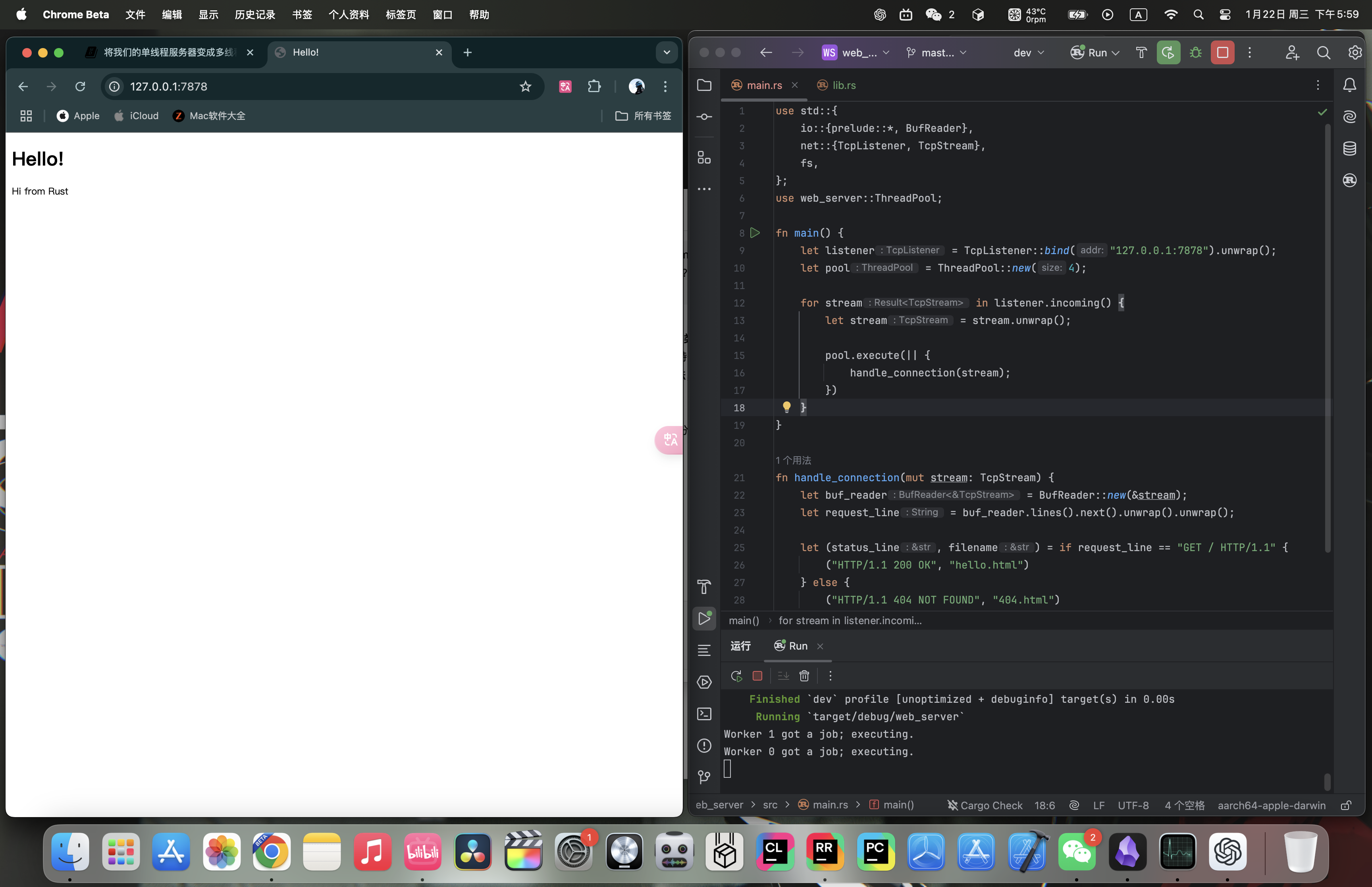
终端输出(哪个 Worker 接到任务是不确定的):
Worker 1 got a job; executing.
Worker 0 got a job; executing.
如果你在浏览器里多刷新几次页面,就能看到其他不同 id 的 Worker 在工作。
20.2.5. 总结
main.rs:
use std::{
    fs,
    io::{prelude::*, BufReader},
    net::{TcpListener, TcpStream},
    thread,
    time::Duration,
};
use web_server::ThreadPool;

fn main() {
    let listener = TcpListener::bind("127.0.0.1:7878").unwrap();
    let pool = ThreadPool::new(4);

    for stream in listener.incoming() {
        let stream = stream.unwrap();

        pool.execute(|| {
            handle_connection(stream);
        });
    }
}

fn handle_connection(mut stream: TcpStream) {
    let buf_reader = BufReader::new(&stream);
    let request_line = buf_reader.lines().next().unwrap().unwrap();

    let (status_line, filename) = match &request_line[..] {
        "GET / HTTP/1.1" => ("HTTP/1.1 200 OK", "hello.html"),
        "GET /sleep HTTP/1.1" => {
            thread::sleep(Duration::from_secs(5));
            ("HTTP/1.1 200 OK", "hello.html")
        }
        _ => ("HTTP/1.1 404 NOT FOUND", "404.html"),
    };

    let contents = fs::read_to_string(filename).unwrap();
    let length = contents.len();

    let response =
        format!("{status_line}\r\nContent-Length: {length}\r\n\r\n{contents}");

    stream.write_all(response.as_bytes()).unwrap();
}lib.rs:
#![allow(unused)]
fn main() {
use std::{
    sync::{mpsc, Arc, Mutex},
    thread,
};

pub struct ThreadPool {
    workers: Vec<Worker>,
    sender: mpsc::Sender<Job>,
}

type Job = Box<dyn FnOnce() + Send + 'static>;

impl ThreadPool {
    /// Create a new ThreadPool.
    ///
    /// The size is the number of threads in the pool.
    ///
    /// # Panics
    ///
    /// The `new` function will panic if the size is zero.
    pub fn new(size: usize) -> ThreadPool {
        assert!(size > 0);
        let (sender, receiver) = mpsc::channel();
        let mut workers = Vec::with_capacity(size);

        let receiver = Arc::new(Mutex::new(receiver));
        for id in 0..size {
            workers.push(Worker::new(id, Arc::clone(&receiver)));
        }

        ThreadPool { workers, sender }
    }

    pub fn execute<F>(&self, f: F)
    where
        F: FnOnce() + Send + 'static,
    {
        let job = Box::new(f);

        self.sender.send(job).unwrap();
    }
}

struct Worker {
    id: usize,
    thread: thread::JoinHandle<()>,
}

impl Worker {
    fn new(id: usize, receiver: Arc<Mutex<mpsc::Receiver<Job>>>) -> Worker {
        let thread = thread::spawn(move || loop {
            let job = receiver.lock().unwrap().recv().unwrap();
            println!("Worker {} got a job; executing.", id);
            job();
        });

        Worker { id, thread }
    }
}
}hello.html:
<!DOCTYPE html>
<html lang="en">
<head>
    <meta charset="utf-8">
    <title>Hello!</title>
</head>
<body>
<h1>Hello!</h1>
<p>Hi from Rust</p>
</body>
</html>
404.html:
<!DOCTYPE html>
<html lang="en">
<head>
  <meta charset="utf-8">
  <title>Hello!</title>
</head>
<body>
<h1>Oops!</h1>
<p>Sorry, I don't know what you're asking for.</p>
</body>
</html>